Free FDA Nutrition Facts Label Generator
Build an FDA Nutrition Facts panel in your browser: pick one of 13 formats, type your serving and nutrient values, watch the label redraw live, then export a print-ready PDF or high-resolution PNG.
How to Create a Nutrition Facts Label in 3 Steps
No design software and no account: three steps take you from an empty panel to a file your printer will accept.
-
Choose a label format
Start with one of the 13 FDA layouts — Standard Vertical for tall cartons, Tabular for small boxes, Linear for narrow strips. The preview switches instantly and keeps every value you have already typed.
-
Enter your serving and nutrient values
Fill in servings per container, serving size and calories, then the nutrient amounts with their %DV. Type the percentage number only — the panel adds the percent sign — and leave a field empty to keep that column blank.
-
Download the print-ready file
Check the panel at full size, then export a PNG at roughly 600 DPI or a PDF at the label's true print dimensions. Both come from the same vector drawing, so nothing shifts between preview and file.
Standard Vertical vs. Tabular (Small Package)
Two of the thirteen layouts, drawn at the same scale. One is tall and narrow, the other wide and short — the panel rules stay the same.
Standard Vertical — 218.9 × 441.9 pt
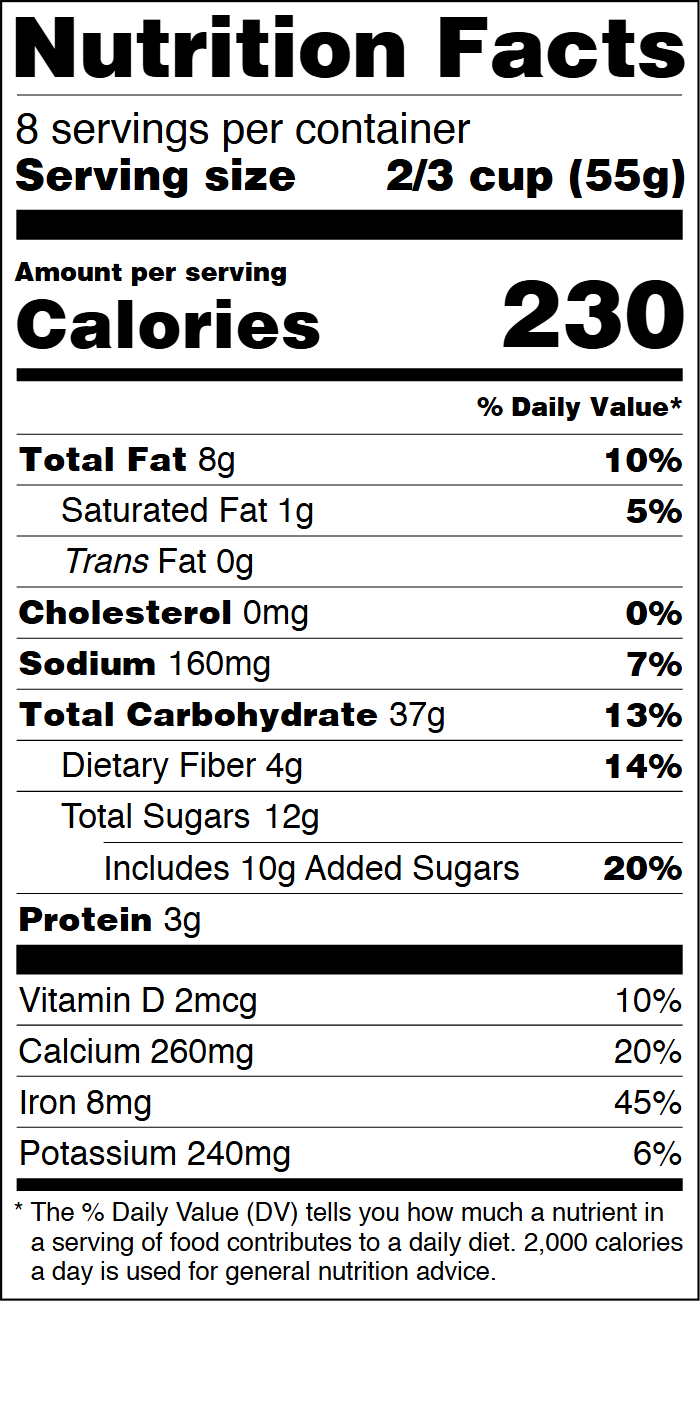
- Tall and narrow: fits a can, carton or tall bag
- Every nutrient stacked in a single column
- Best when height is available and width is not
Tabular — 421 × 251.2 pt

- Wide and short: fits a small box or pouch
- Nutrients split into two balanced columns
- Best when panel height is the limit
What the Generator Does
13 FDA panel formats
Standard Vertical, Simplified, Micronutrients Side by Side, Tabular, Linear and eight more — each drawn to FDA panel geometry rather than traced from a picture.
Live preview while you type
Every keystroke redraws the panel at full size, so the label you check is exactly the label you download.
Print-accurate PNG and PDF
The PNG renders at roughly 600 DPI and the PDF uses the label's real dimensions, with typefaces embedded so no font is ever substituted.
Batch sheets on US Letter
Tile up to 500 copies at 100% scale, with crop marks, a 50 mm check ruler and a calibration sheet to prove nothing was resized.
Why Use This Label Generator
Everything stays in your browser
The label is generated locally. No value is uploaded, so an unreleased recipe or product spec never leaves your machine.
No account, no install
There is nothing to sign up for and no plugin to install. Open the page, type your numbers and export.
FDA geometry, not a lookalike
Rule weights, type sizes and panel widths follow the FDA layouts, so a printed label holds up next to a commercially prepared one.
One dataset, thirteen layouts
Switch format without retyping: the same values reflow into every panel, including the small-package tabular form.
Exports a print shop accepts
A true-size PDF and a high-resolution PNG from the same vector source, plus batch sheets that carry crop marks and a scale check.
Free to preview, pay to download clean
Check your panel with a watermark at no cost. Only the unwatermarked PDF or batch sheet is paid, so trying it costs nothing.
Who Uses the Nutrition Label Generator
Six everyday cases where a correct panel matters more than a design budget.
Cottage food and market sellers
State rules usually require a Nutrition Facts panel. Generate one before the first market day without hiring a designer.
Coffee roasters and bakeries
Small batches change often. Update calories and serving size per blend, then reprint only the label that changed.
Snack and supplement startups
Prototype packaging for buyer meetings in an afternoon, then hand the print-ready PDF to the co-packer.
Private-label brands
Reuse one nutrient profile across dozens of SKUs by swapping the ingredient block instead of rebuilding the whole panel.
Nutrition consultants
Turn a recipe analysis into a printable label for a client in one sitting, with every %DV already in place.
Students and food-science courses
Explore how the FDA panel is built — required rows, indents, %DV columns — with a tool that responds instantly.
Frequently Asked Questions About Nutrition Facts Labels
Is this nutrition label generator free?
The generator and every layout are free to use, and the preview has no time limit. Preview downloads carry a watermark; the clean single-label PDF is $3 and the printable batch sheet, which also includes a single-label PDF and PNG, is $5. Nothing is charged until you choose to download.
Does the generator follow FDA Nutrition Facts rules?
Each layout follows the FDA panel geometry — the same rule weights, type sizes and column positions used on official labels — including the simplified, tabular and linear formats permitted for small packages. The tool formats your data; you remain responsible for the accuracy of the values and of any claims you make.
Where is my product data stored?
Nowhere. The panel is generated by JavaScript running in your browser, so nutrient values are never sent to a server and are not saved between visits. Reloading the page returns the sample values, which also means an unpublished recipe never leaves your device.
What does %DV mean and do I have to fill it in?
Percent Daily Value shows how much a nutrient in one serving contributes to a 2,000-calorie diet. Type the number and the panel prints it with a percent sign; leave the field empty and that column stays blank. The tool does not calculate %DV from your nutrient amounts, because that needs per-nutrient reference values.
Can I export a print-ready file?
Yes. The PNG is rendered at roughly 600 DPI from vector data, and the PDF is sized to the label's real print dimensions, where one SVG unit equals 0.75 point. Fonts are embedded in both, so a print shop sees the same typography you previewed on screen.
What is the difference between the single-label PDF and the batch sheet?
The $3 PDF gives you one label at true size. The $5 batch sheet tiles 1 to 500 copies onto US Letter pages at 100% scale with optional crop marks and a 50 mm ruler, and its ZIP also contains the single-label PDF and PNG. Choose it when you need many identical labels.
Which format should I pick for a small package?
Tabular is designed for wide, short panels and Linear for narrow strips, while Standard Vertical needs a tall face. Switch between formats with your values already filled in: the panel keeps the data, which makes it easy to see which shape covers the space you have.
Does it work on a phone or tablet?
Yes. Below 1180 pixels the layout stacks into one column, the preview has its own zoom buttons and a Fit control, and the download buttons stay at the bottom of the page. Large batch sheets are still easier to review on a desktop or tablet screen.
Ready to Build Your Nutrition Facts Label?
Start with a format, type your values, and download the file your printer asks for.
Open the label generator